The Modified Copernicus Digital Elevation Model used by the NISAR Mission is a tiled collection of Cloud-Optimized GeoTIFF (COG) files representing the DEM used for processing NISAR products.
DEM for NISAR Overview
The DEM used for NISAR product generation is derived from the Copernicus DEM 30-m COP-DEM_GLO-30-DGED/2023_1. Elevation values are re-referenced vertically from the EGM2008 geoid model to the WGS84 ellipsoid model, and areas over the ocean are filled. This results in a DEM suitable for use in SAR processing workflows, with complete global coverage.
This dataset allows SAR scientists to generate their own higher-level products from NISAR data using the same input DEM as the mission-generated products.
The data are available from NASA’s Alaska Satellite Facility Distributed Active Archive Center (ASF DAAC) through Earthdata Search as well as through direct S3 access within the AWS us-west-2 region.
DEM Datasets
The DEM is provided in three different projections:
The DEM dataset in the WGS84 projection provides global coverage, while the DEM datasets in polar projections are only available for regions beyond 60 degrees north or south.
).](/build/dem-extent-4326-5c8b1ef9a62118a0071a554dd989aa4e.png)
Figure 2:Visualization of the WGS84 DEM for NISAR. This dataset provides global coverage using the World Geodetic System 1984 (WGS84) geographic coordinate system (EPSG 4326).
), based on the WGS84 coordinate reference system.](/build/dem-extent-3413-e2d647d3eefb19e4a841619ceea61df2.png)
Figure 3:Visualization of the North Polar Stereographic DEM for NISAR. This dataset provides coverage north of 60°N using the NSIDC Sea Ice Polar Stereographic North projected coordinate system (EPSG 3413), based on the WGS84 coordinate reference system.
), based on the WGS84 coordinate reference system.](/build/dem-extent-3031-bc40084785a0934ca46301455f9e5ce7.png)
Figure 4:Visualization of the South Polar Stereographic DEM for NISAR. This dataset provides coverage south of 60°S using the Antarctic Polar Stereographic projected coordinate system (EPSG 3031), based on the WGS84 coordinate reference system.
DEM Dataset Characteristics
Table 1:DEM for NISAR Dataset Characteristics
| WGS84 | North Polar | South Polar | |
|---|---|---|---|
| EPSG Code | 4326 | 3413 | 3031 |
| Spatial Extent | Global | North of 60°N Latitude | South of 60°S Latitude |
| Pixel Spacing | 30 m | 20 m* | 20 m* |
| Tiling Scheme | 1 x 1 degree | 100 x 100 km | 100 x 100 km |
| Readme File | EPSG4326 Readme | EPSG3413 Readme | EPSG3031 Readme |
* While the polar stereographic datasets have a pixel spacing of 20 meters, they are derived from the Copernicus 30-m DEM, so the resolution is coarser than the pixel spacing.
DEM Naming Conventions
The actual filenames of the DEM tiles are quite basic, differing only by the indication of the geographic location of the tile. While the naming scheme allows for two decimal places for each tile reference term, product names for all tiles use _00 in the decimal placeholder.
WGS84 Tiling Scheme
The WGS84 files include the latitude and longitude of the lower left corner of the tile.
For example:
DEM_N17_00_E135_00_C01.tif
N17indicates that the lower left corner of the tile is at 17°NE135indicates that the lower left corner of the tile is at 135°E
Polar Stereographic Tiling Scheme
The North Polar Stereographic (Figure 5) and South Polar Stereographic (Figure 6) datasets have equivalent tiling schemes and use a common naming convention.
The coverage for these datasets is overlain with a 100 x 100 km grid, which is used to determine the extent of each DEM file. Tile coordinates (in both the X and Y axes of the grid) are numbered from 06 to 73, with tiles 39 and 40 straddling the pole. The tile coordinates are indicated in the name of each DEM file.
For example:
DEM_20_00_64_00_C01.tif
20refers to the bottom-to-top Y coordinate of the tile64refers to the left-to-right X coordinate of the tile
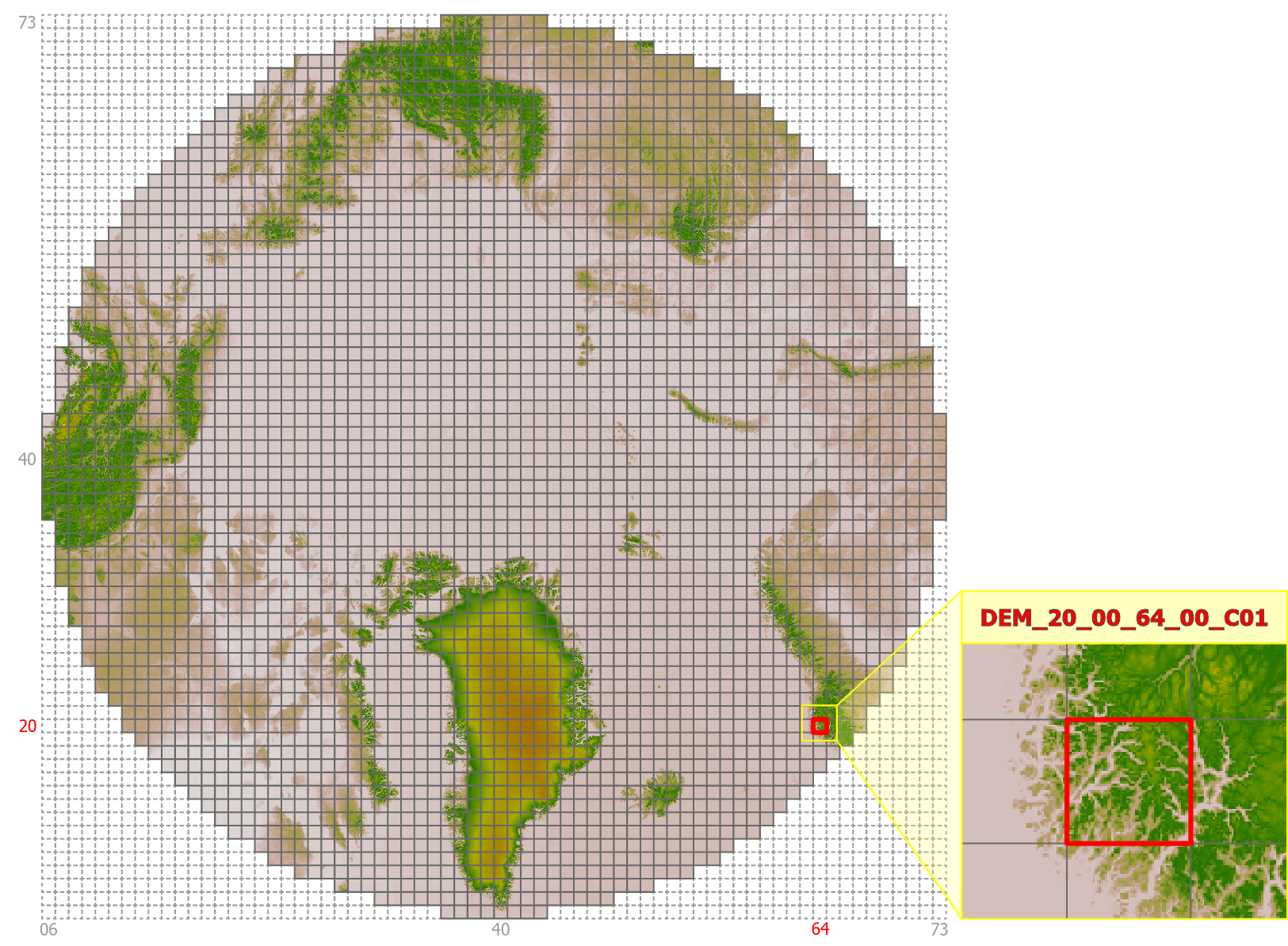
Figure 5:Gridding system for the North Polar Stereographic DEM dataset.
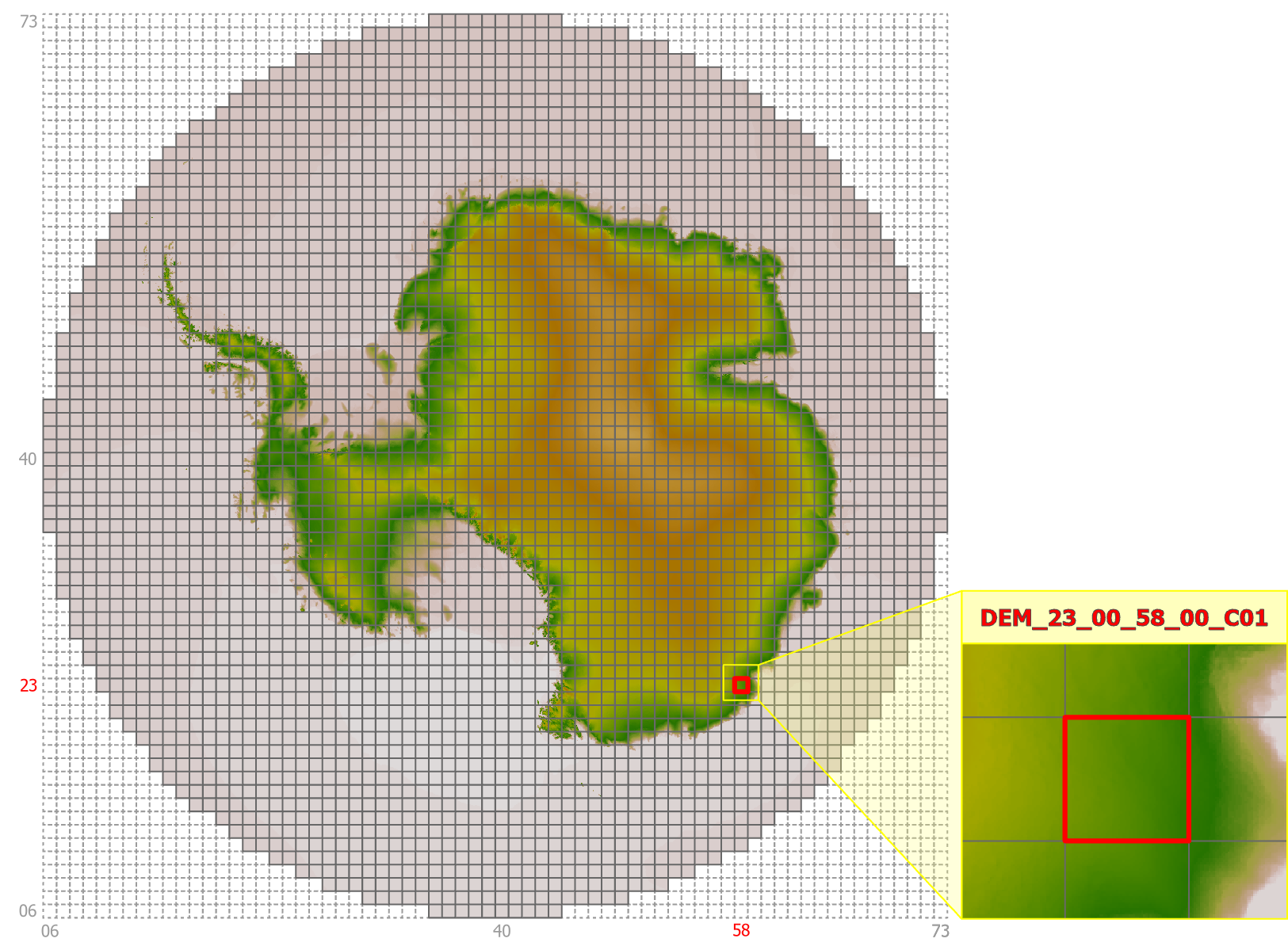
Figure 6:Gridding system for the South Polar Stereographic DEM dataset.
Earthdata File Titles
In Earthdata Search, each file is given a title that includes the coordinate system code (EPSG number). These titles are based on the S3 path where the files are stored, and results in a unique title for each file.
While these unique titles are helpful for finding specific DEM files during the search process, the actual filenames of the downloaded files only partially match these titles. This is particularly important to know when working with the polar stereographic datasets, as the filenames used for the north and south polar datasets are identical.
Examples comparing Earthdata titles to actual filenames:
WGS84
Earthdata title:
v1-2-EPSG4326-N20-N20_E160-DEM_N23_00_E162_00_C01-tifFile name:
DEM_N23_00_E162_00_C01.tif
North Polar Stereographic
Earthdata title:
v1-2-EPSG3413-60_40-DEM_73_00_43_00_C01-tifFile name:
DEM_73_00_43_00_C01.tif
South Polar Stereographic
Earthdata title:
v1-2-EPSG3031-60_40-DEM_73_00_43_00_C01-tifFile name:
DEM_73_00_43_00_C01.tif
DEM File Types
The actual DEM data is contained in tiled assemblages of Cloud Optimized GeoTIFF (COG) files, but the NISAR_DEM collection also includes VRT files. VRTs are virtual files that reference the tiled DEM COGs, allowing them to be visualized as a mosaic.
Tiled DEM COG Files
The DEM height values are contained in the COG files. The files are tiled to provide complete coverage for each of the projection-based datasets included in the DEM collection. The tiling scheme differs based on the projection, as indicated in Table 1.
These files have an extension of .tif.
VRT Reference Files
To facilitate visualization and subsetting of the tiled DEM COG files, VRT files are available for each polarization. These VRT files are just a metadata file, and require access to the associated DEM COG files to be useful.
These files have an extension of .vrt.
There are multiple VRT files for each projection. Each projection has a dataset-wide VRT, with one or more layers of VRTs that organize smaller subsets of data:
The global WGS84 dataset includes a VRT for each latitude band, which each reference another layer of VRTs grouping smaller collections of COGs within each latitude band.
The datasets with polar projections just have one layer of VRTs under the dataset-wide VRT, grouping together collections of COGs by spatial location.
The VRT files are more useful when interacting with the DEM files directly in the cloud, where they can be used to find the necessary DEM COGs for an area of interest in programmatic workflows. Refer to Subsetting via Global VRT Mosaics for more guidance.
Finding DEM Files
The DEM for NISAR files can be found in Earthdata Search by searching for “NISAR_DEM”.
Find Data in Earthdata Search
All three DEM datasets (with their tiled GeoTIFFs and associated VRT files) are included in one NISAR_DEM collection. They are accessible through Earthdata Search, but not currently discoverable in Vertex. The projection is included in the title for each DEM file in Earthdata Search, making it easy to restrict searches to a single projection.
Each DEM filename gives an indication of its geographic location, which you can use to locate the tiles you need, but it is easiest to use Earthdata Search to find the necessary tiles for a specific geographic area of interest. To incorporate subsetting into a programmatic workflow, it is useful to leverage Subsetting via Global VRT Mosaics.
S3 File Organization
The DEM files are hosted in NASA’s Earthdata Cloud (EDC), in the same S3 bucket as the data products from the NISAR mission. While the DEM files for all three projections are included in a single Earthdata collection (NISAR_DEM), they are archived under projection-specific S3 prefixes in EDC.
When searching for DEM files directly in S3, the path includes the DEM prefix, followed by a version prefix (v1.2), then a prefix specific to each different projection:
/DEM/v1.2/EPSG4326/DEM/v1.2/EPSG3413/DEM/v1.2/EPSG3031
Refer to S3 Access Overview for more information on direct S3 access.
Subsetting via Global VRT Mosaics
A global mosaic is provided for each DEM in the form of a VRT file. This enables subsetting the global DEM to any specific area of interest while downloading only the needed data.
The following examples demonstrate subsetting using the gdalwarp utility via the /vsicurl and /vsis3 drivers. These examples will subset the DEM VRT to a 0.1° x 0.1° region in Death Valley, CA, USA.
Subsetting via /vsicurl
GDAL’s /vsicurl driver enables interacting with data files hosted online through a URL. The URLs for the three VRT mosaics are:
https://nisar.asf.earthdatacloud.nasa.gov/NISAR/DEM/v1.2/EPSG4326/EPSG4326.vrt
https://nisar.asf.earthdatacloud.nasa.gov/NISAR/DEM/v1.2/EPSG3413/EPSG3413.vrt
https://nisar.asf.earthdatacloud.nasa.gov/NISAR/DEM/v1.2/EPSG3031/EPSG3031.vrt
Create a
.netrcfile containing your Earthdata Login credentials as described in Creating a .netrc File for Earthdata LoginSet the following GDAL configuration options via environment variables:
export GDAL_DISABLE_READDIR_ON_OPEN=TRUE
export GDAL_HTTP_COOKIEFILE=~/cookies.txt
export GDAL_HTTP_COOKIEJAR=~/cookies.txt
Run the subsetting command:
gdalwarp /vsicurl/https://nisar.asf.earthdatacloud.nasa.gov/NISAR/DEM/v1.2/EPSG4326/EPSG4326.vrt out.tif -te -116.7 35.9 -116.6 36.0
Subsetting via /vsis3
GDAL’s /vsis3 driver enables interacting with data files hosted in AWS S3. The S3 URIs for the three VRT mosaics are:
s3://sds-n-cumulus-prod-nisar-products/DEM/v1.2/EPSG4326/EPSG4326.vrt
s3://sds-n-cumulus-prod-nisar-products/DEM/v1.2/EPSG3413/EPSG3413.vrt
s3://sds-n-cumulus-prod-nisar-products/DEM/v1.2/EPSG3031/EPSG3031.vrt
Configure temporary AWS credentials as described in S3 Access Overview.
Run the subsetting command:
gdalwarp /vsis3/sds-n-cumulus-prod-nisar-products/DEM/v1.2/EPSG4326/EPSG4326.vrt out.tif -te -116.7 35.9 -116.6 36.0
Acknowledging the DEM for NISAR
Users, including those who redistribute, adapt, modify, or combine Copernicus DEM for NISAR data, must comply with the terms of the Copernicus DEM 30m License Agreement. For additional information, please refer to Modified Copernicus Digital Elevation Models used by the NASA-ISRO Synthetic Aperture Radar (NISAR) Mission and Copernicus DEM - Global and European Digital Elevation Model.
When distributing the Modified Copernicus DEM for NISAR, acknowledge the dataset using the following statement:
Produced using Copernicus WorldDEM-30 © DLR e.V. 2010-2014 and © Airbus Defence and Space GmbH 2014-2018 provided under COPERNICUS by the European Union and ESA; all rights reserved. The organisations in charge of the Copernicus programme by law or by delegation do not incur any liability for any use of the Copernicus WorldDEM-30.
Citing the DEM
To cite the Modified Copernicus Digital Elevation Models used by the NASA-ISRO Synthetic Aperture Radar (NISAR) Mission, refer to the Dataset Citation.
- Copernicus DEM. (2022). In Copernicus DEM. European Space Agency. 10.5270/esa-c5d3d65
- Snay, R. A. (1988). Evolution of NAD 83 in the United States: Journey from 2D toward 4D. Journal of Surveying Engineering, 138(4). 10.1061/(ASCE)SU.1943-5428.0000083
- NASA/JPL/NISAR. (2026). Modified Copernicus Digital Elevation Models used by the NASA-ISRO Synthetic Aperture Radar (NISAR) Mission. NASA Alaska Satellite Facility Distributed Active Archive Center. 10.5067/NIDEM-1