S3 Access Overview
All NISAR data is hosted in NASA’s Earthdata Cloud (EDC), which leverages Amazon Web Services (AWS) infrastructure. As such, AWS Simple Storage Service (S3) access methods can be used to interact with NISAR datasets.
Data users can request temporary AWS credentials enabling direct access to the data in S3. This supports the use of a wide range of S3-aware tooling for interacting with cloud-hosted data as well as for low-latency and high-throughput data access patterns.
NISAR S3 Buckets
There are three S3 buckets associated with the NISAR mission:
sds-n-cumulus-prod-nisar-productscontains the production data productssds-n-cumulus-prod-nisar-browsecontains the browse imagery associated with the data productssds-n-cumulus-prod-nisar-ur-productswill contain urgent response products when/while they are available
Using the AWS CLI to Access NISAR Data
Users can leverage direct S3 access from other AWS services, such as EC2 and Lambda, as long as the resources are in the us-west-2 (Oregon) region.
1. Obtain temporary AWS credentials
There are two options for obtaining temporary AWS credentials. You can either visit the NISAR S3 credentials endpoint directly, or use the earthacess Python package to programmatically retrieve your temporary credentials.
Option 1: Visit the NISAR S3 credentials endpoint
Visit https://
The text displayed at the site provides four pieces of information:
AWS Access Key ID
AWS Secret Access Key
AWS Session Token
Expiration Time
For example:
{
 accessKeyId: "ASIAIOSFODNN7EXAMPLE",
 secretAccessKey: "wJalrXUtnFEMI/K7MDENG/bPxRfiCYEXAMPLEKEY",
 sessionToken: "LONGSTRINGOFCHARACTERS...6XUxCYEwbjGVKkzSNQh/",
 expiration: "2026-01-27 00:50:09+00:00"
}
More details about requesting temporary S3 credentials are available here.
Option 2: Use the earthaccess Python package
import earthaccess

auth = earthaccess.login()

endpoint = 'https://nisar.asf.earthdatacloud.nasa.gov/s3credentials'
s3_credentials = auth.get_s3_credentials(endpoint=endpoint)
which will print, for example:
{
 "accessKeyId": "ASIAIOSFODNN7EXAMPLE",
 "secretAccessKey": "wJalrXUtnFEMI/K7MDENG/bPxRfiCYEXAMPLEKEY",
 "sessionToken": "LONGSTRINGOFCHARACTERS...6XUxCYEwbjGVKkzSNQh/",
 "expiration": "2026-01-27 00:50:09+00:00",
}
For more information about using the earthaccess package with NISAR, see the Earthaccess NISAR guide.
2. Configure environment to use temporary AWS credentials
You will need to set the environment variables in your terminal.
Linux or Mac users can export their credentials using the following commands:
$ export AWS_ACCESS_KEY_ID=ASIAIOSFODNN7EXAMPLE
$ export AWS_SECRET_ACCESS_KEY=wJalrXUtnFEMI/K7MDENG/bPxRfiCYEXAMPLEKEY
$ export AWS_SESSION_TOKEN=AQoDYXdzEJr...<remainder of session token>
Windows users can export their credentials using the following commands:
C:\> SET AWS_ACCESS_KEY_ID=ASIAIOSFODNN7EXAMPLE
C:\> SET AWS_SECRET_ACCESS_KEY=wJalrXUtnFEMI/K7MDENG/bPxRfiCYEXAMPLEKEY
C:\> SET AWS_SESSION_TOKEN=AQoDYXdzEJr...<remainder of token>
For a full list of exportable variables, see AWS’s Temporary Credentials User Guide.
3. Find NISAR products of interest
NISAR production data is all hosted in the sds-n-cumulus-prod-nisar-products S3 bucket. Each product type has a prefix, and while you cannot list the full bucket contents, you can list the contents of each prefix. Refer to Prefix Structure for more information about the organization of the NISAR bucket and a table of prefixes for the NISAR data products and supporting products.
For example, if you want to list all available GCOV products, you can use this aws s3 ls command:
aws s3 ls s3://sds-n-cumulus-prod-nisar-products/NISAR_L2_GCOV_BETA_V1/Within each product type prefix, there is a nested prefix for each individual product, with no additional hierarchy for grouping the individual products. Refer to Finding S3 Paths for tools and methods available to help you find specific products of interest.
Note that NISAR browse imagery and NISAR Urgent Response products are hosted in different buckets than the production NISAR datasets.
4. Open or download data files
Once you have an S3 path for an item of interest, you can download the file to your compute environment using the aws s3 cp AWS CLI command. You will need to include all relevant prefixes in your path. For example:
aws s3 cp s3://sds-n-cumulus-prod-nisar-products/PRODUCT_TYPE_PREFIX/PRODUCT_NAME_PREFIX/PRODUCT_NAME.ext path/to/local/dirThis example shows how to download one of the SME2 files from the S3 archive:
aws s3 cp s3://sds-n-cumulus-prod-nisar-products/NISAR_L3_SME2_BETA_V1/NISAR_L3_PR_SME2_008_007_D_073_4005_DHDH_A_20251216T164223_20251216T164300_X05007_N_F_J_001/NISAR_L3_PR_SME2_008_007_D_073_4005_DHDH_A_20251216T164223_20251216T164300_X05007_N_F_J_001.h5 .Prefix Structure
Products are stored with the same prefix structure in all three NISAR S3 buckets. Each product type has a prefix, then each available product of that product type has an individual product prefix nested inside the product type prefix.
To access a product, the S3 path must contain the NISAR bucket name, the product type prefix, and the individual product prefix, followed by the full filename (including the extension), as illustrated here:s3://sds-n-cumulus-prod-nisar-BUCKET/PRODUCT_TYPE_PREFIX/PRODUCT_NAME_PREFIX/PRODUCT_NAME.ext
Table 1 lists the prefix for each of the NISAR data product types, and Table 2 lists the prefix for each of the NISAR supporting data types.
Prefix Tables
Table 1:NISAR Data Product S3 Prefix List
| Product | S3 Prefix |
|---|---|
| SME2 | NISAR_L3_SME2_BETA_V1/ |
| GCOV | NISAR_L2_GCOV_BETA_V1/ |
| GUNW | NISAR_L2_GUNW_BETA_V1/ |
| GOFF | NISAR_L2_GOFF_BETA_V1/ |
| GSLC | NISAR_L2_GSLC_BETA_V1/ |
| RUNW | NISAR_L1_RUNW_BETA_V1/ |
| RIFG | NISAR_L1_RIFG_BETA_V1/ |
| ROFF | NISAR_L1_ROFF_BETA_V1/ |
| RSLC | NISAR_L1_RSLC_BETA_V1/ |
Table 2:NISAR Supporting Data S3 Prefix List
| Product | S3 Prefix |
|---|---|
| DEM for NISAR | DEM/ |
| Forecast Orbit Ephemeris | FOE/ |
| Near real-time Orbit Ephemeris | NOE/ |
| Medium precision Orbit Ephemeris | MOE/ |
| Precise Orbit Ephemeris | POE/ |
Production NISAR Data
NISAR data products are hosted in the sds-n-cumulus-prod-nisar-products S3 bucket. This bucket cannot currently be searched from the root, but you can list the contents from each product type prefix onward through the prefix hierarchy.
Here is an example of the S3 path for one of the available GCOV products:
s3://sds-n-cumulus-prod-nisar-products/NISAR_L2_GCOV_BETA_V1/NISAR_L2_PR_GCOV_005_172_A_008_2005_DHDH_A_20251122T024618_20251122T024652_X05007_N_F_J_001/NISAR_L2_PR_GCOV_005_172_A_008_2005_DHDH_A_20251122T024618_20251122T024652_X05007_N_F_J_001.h5
NISAR Browse Imagery
NISAR browse imagery is hosted in a different bucket than the actual data products. The prefix structure for sds-n-cumulus-prod-nisar-browse is the same as for the production NISAR data, but this bucket can be searched from the root directory if desired.
Within each product name prefix, there are two different browse and thumbnail files available in PNG format. The images displayed on the maps in Vertex and Earthdata Search are the main PNG files. Files tagged with _thumbnail.png are very small images used for applications like the Vertex search results, which require low resolution (100 x 100 pixels).
Here is an example of the S3 path for one of the available GCOV browse images:
s3://sds-n-cumulus-prod-nisar-browse/NISAR_L2_GCOV_BETA_V1/NISAR_L2_PR_GCOV_005_172_A_008_2005_DHDH_A_20251122T024618_20251122T024652_X05007_N_F_J_001/NISAR_L2_PR_GCOV_005_172_A_008_2005_DHDH_A_20251122T024618_20251122T024652_X05007_N_F_J_001.png
NISAR Urgent Response
The NISAR mission will produce Urgent Response (UR) products when natural disasters or other major events occur. These products may use less precise orbits in order to make data available as quickly as possible. UR products will be hosted in sds-n-cumulus-prod-nisar-ur-products, and will be retained for 30 days, allowing time for a standard product to become available before the UR product is deleted.
Finding S3 Paths
As more data becomes available, you may want to use wildcard searches with the aws s3 ls command to find specific products of interest. The product filenames contain a lot of information that can be used to restrict your search, such as track and/or frame numbers, acquisition dates, processing version, beam mode, polarization, and orbit direction.
Understanding the NISAR Naming Conventions can be helpful when constructing wildcard searches to narrow your results to specific products.
S3 Paths from Vertex
When you search for NISAR data products in Vertex, you can simply copy the S3 URL from the list of files for a search result, as shown in Figure 1.
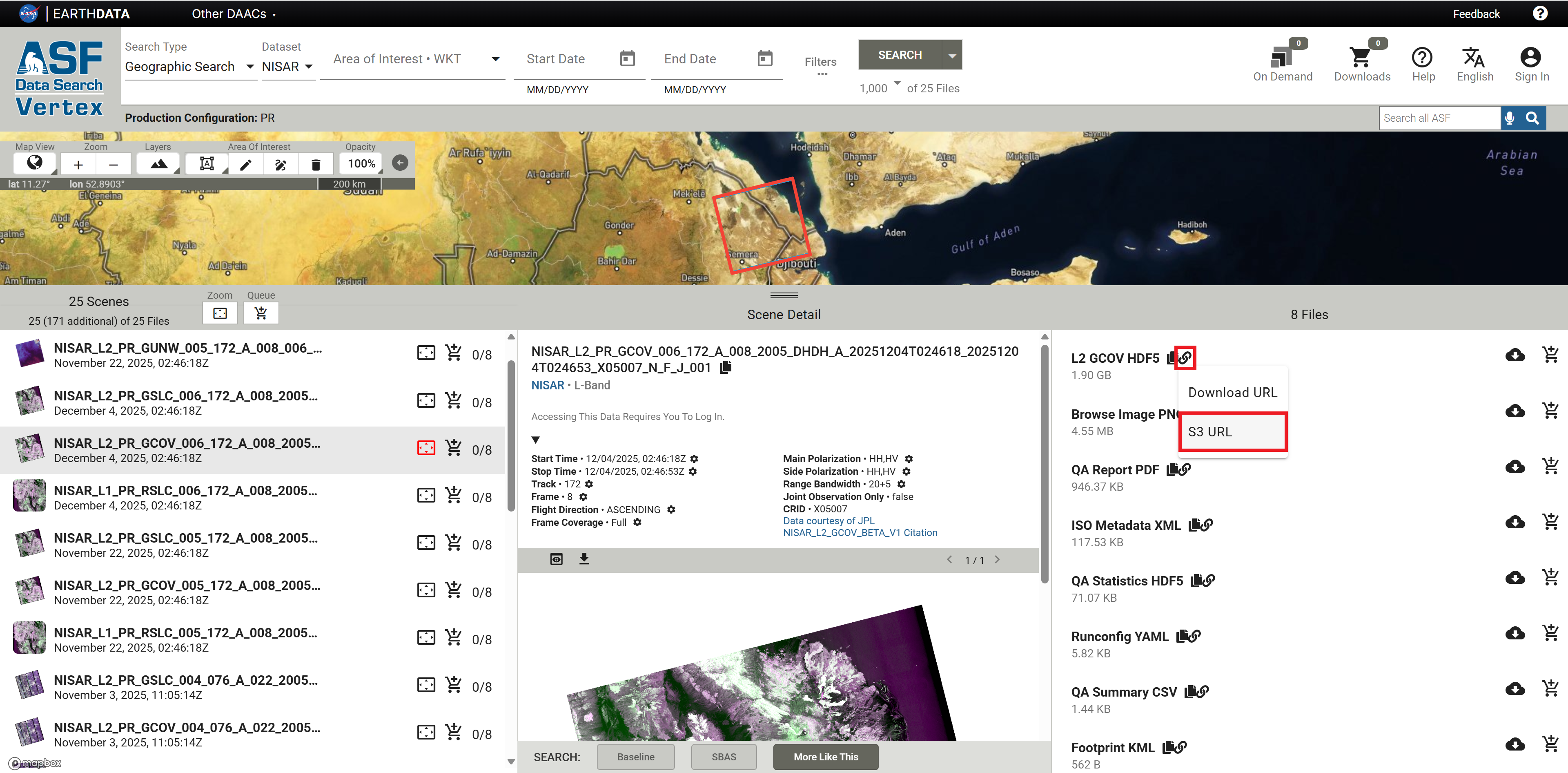
Figure 1:S3 URL links are available for files listed in Vertex search results for NISAR products.
To copy S3 URLs from Vertex:
Select an item in the left panel of the search results
The files available for that item are listed in the right panel
You may need to adjust your browser window size to see the third panel
In the right panel, click on the link icon next to the desired file
Select S3 URL from the drop-down menu to copy the path to your clipboard
S3 Paths from Earthdata Search
When you search for NISAR data products in Earthdata Search, S3 links are available to copy from the search results, as shown in Figure 2.
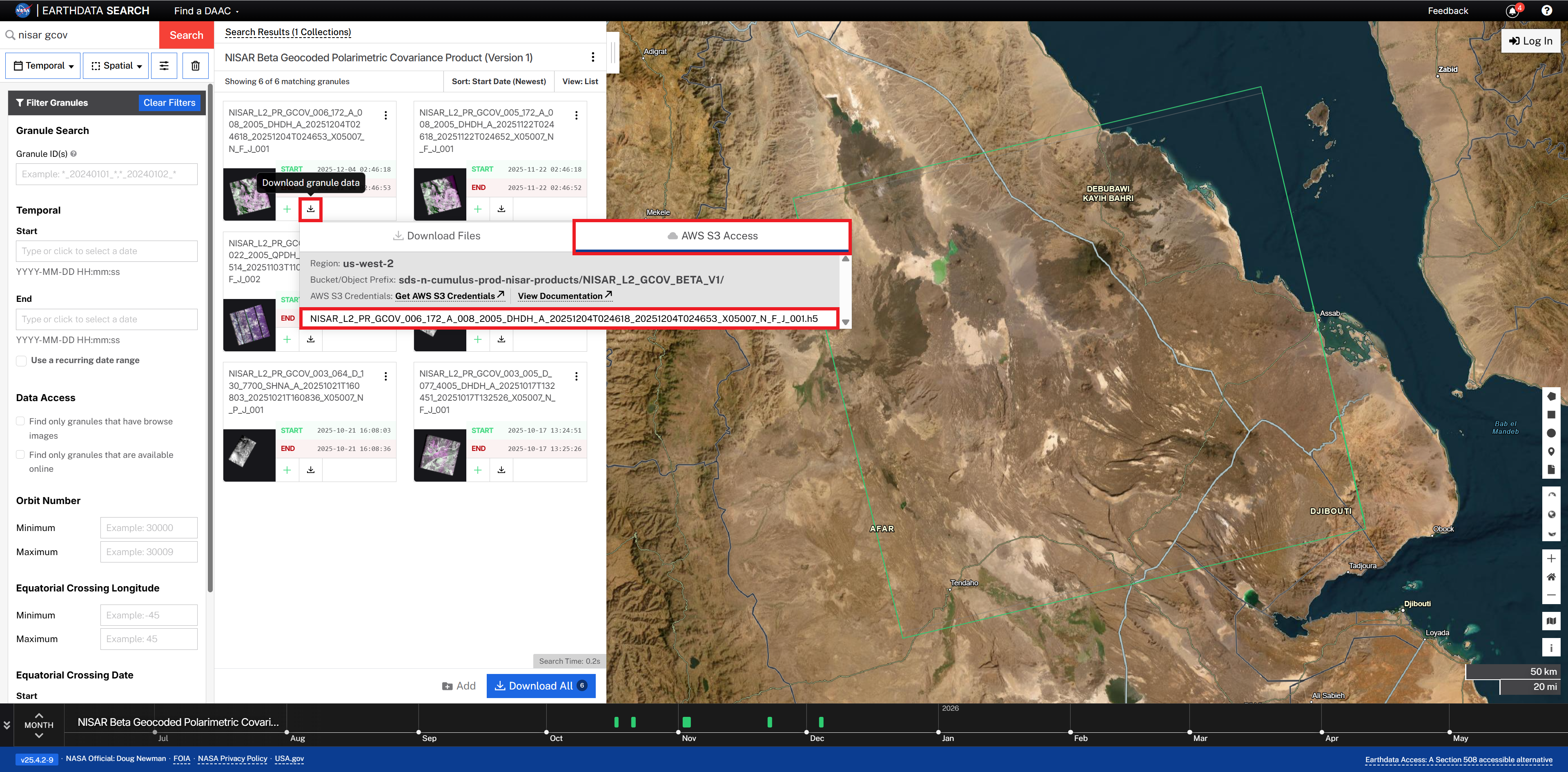
Figure 2:S3 URL links are available for files listed in Earthdata Search results for NISAR products.
To copy S3 URLs from Earthdata Search:
Click on the Download button for the desired product
Select the AWS S3 Access tab
Click the filename to copy the S3 URL to your clipboard
S3 Access Limitations
Please note that direct S3 access for NISAR data is subject to these limitations:
Temporary credentials only allow access from within the us-west-2 region. Users attempting to access the NISAR S3 bucket from other regions or outside AWS will encounter an
Access Deniederror.Temporary credentials expire after one hour. The expiration time is listed in the temporary credential payload, as shown in Step 1. You can revisit the temporary credential link for a new set of credentials when they expire.
Temporary credentials cannot be used to copy content directly from the NISAR S3 bucket to another S3 bucket. Users can only download content or use tools that interact with the data directly in S3 storage.